






My 9-Year-Old's Roblox Account Got Hacked
A tutorial told him to paste data into the browser console. They stole his session cookie, logged in from Germany and drained his Robux. Here's what happened
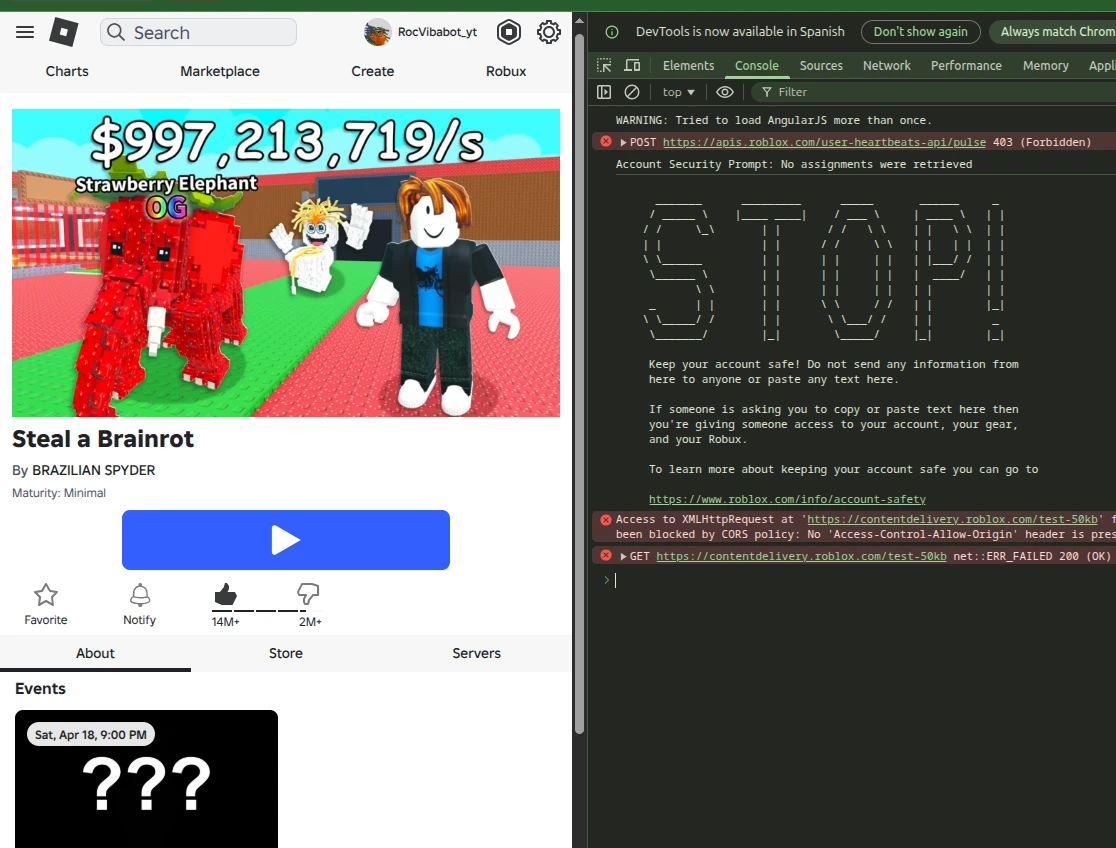
Last week, my son’s Roblox account got hacked. He’s 9. It wasn’t some shadowy hacker in a dark room. It was a tutorial that told him to copy and paste something into the browser console.
Here’s what happened, step by step. And what we learned.
Roc builds games in Roblox Studio
My son Roc has been programming games in Roblox Studio for months. He watches tutorials, tries things, gets stuck, finds another tutorial and keeps going. Self-taught at nine years old. I think it’s incredible.
I usually keep a close eye on what he does online. But I wasn’t too worried because he was programming — building things, not passively consuming content. It didn’t cross my mind that he’d reach the point of opening the browser console and running instructions he didn’t understand.
What happened: the tutorial that stole cookies
One of the tutorials he found taught how to copy games already published on Roblox. It gave him a series of steps to follow in the browser. One of those steps told him to open the browser console — the developer tool you get with F12 — and copy everything from a specific section.
What Roc didn’t know — and what I hadn’t taught him — is that section contained his account’s session cookie. By copying it and pasting it where the tutorial told him to, he gave that page full access to his Roblox account. No password needed. No verification. Just the cookie.
The page gave him the game assets he wanted to copy. Roc thought it worked.
The alert: Roblox account accessed from Germany
A few days later, I got a notification on my Roblox parental account: someone had logged in from Germany.
I checked the access history. There were several logins from locations that weren’t ours. I immediately did three things:
- Closed all active sessions from Roblox security settings.
- Changed the password on Roc’s account.
- Enabled two-step verification with an authenticator app (Google Authenticator), not just email.
Then I sat down to investigate. I went through Roc’s browser history from the past three days. Found the tutorial. Saw the steps. And understood exactly what had happened.
Stolen Robux: the 3 euros that vanished
Roc had 3 euros worth of Robux in his account. Not much, but it was his.
Whoever accessed his account went into several Roblox experiences that let you donate Robux to other users. They made donations to unknown accounts until the balance hit zero.
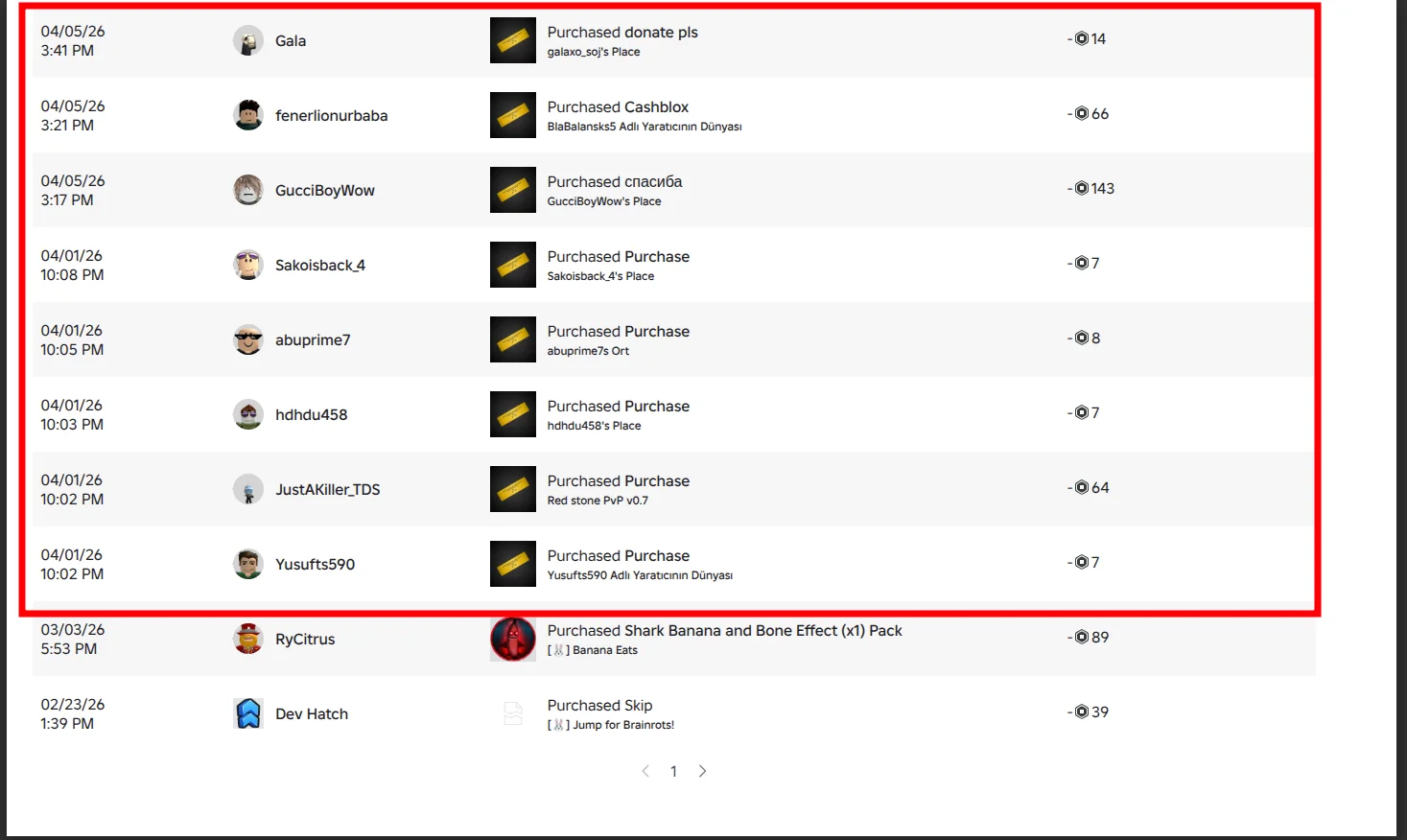
The transactions marked in red are the fraudulent ones. The two at the bottom (Shark Banana and Skip) are real purchases Roc made weeks earlier. The difference is obvious: the fraudulent ones are all “Purchased Purchase” or donations to users Roc doesn’t know, from locations that aren’t ours.
We contacted Roblox support. Sent them the fraudulent transactions and explained the case.
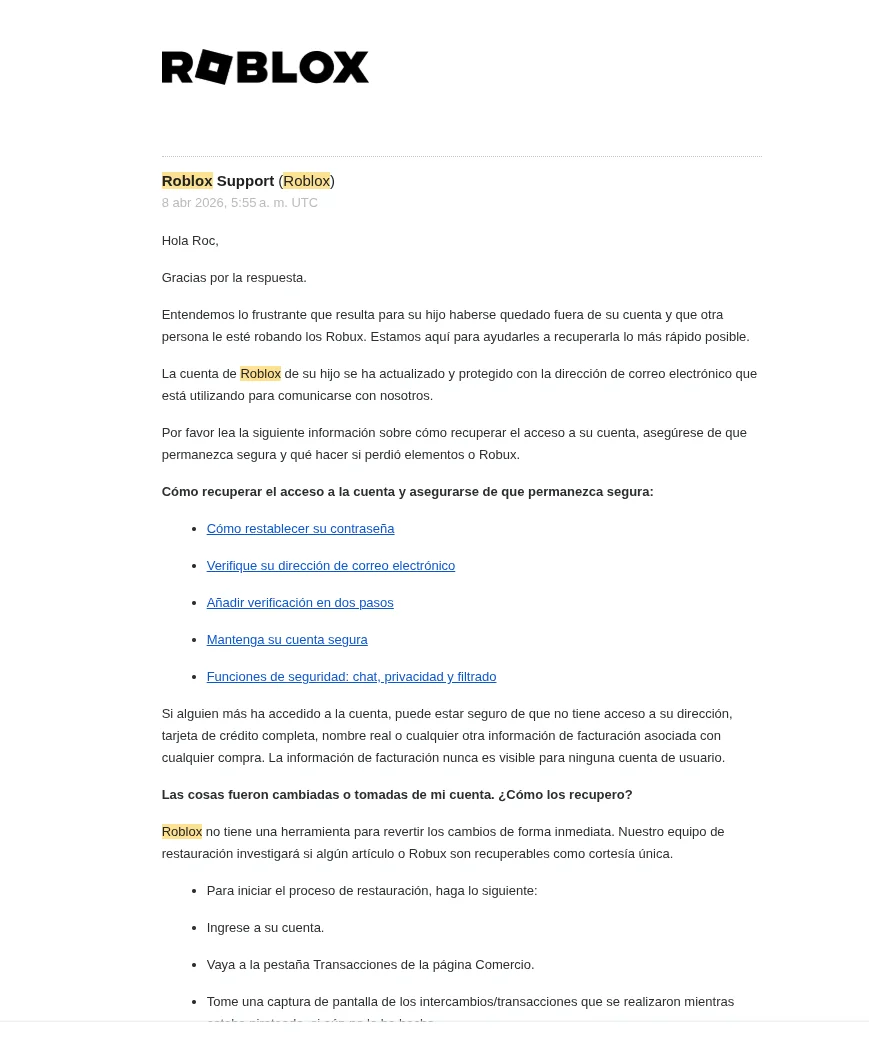
Roblox responded within a week. They confirmed the account was secured and gave us the steps to start the Robux restoration process. They’re investigating.
Update: Roblox returned the Robux
On April 15, Roblox emailed us confirming they’d recovered the stolen Robux. Roc’s 3 euros are back in his account. The whole process — from reporting to recovery — took about two weeks.
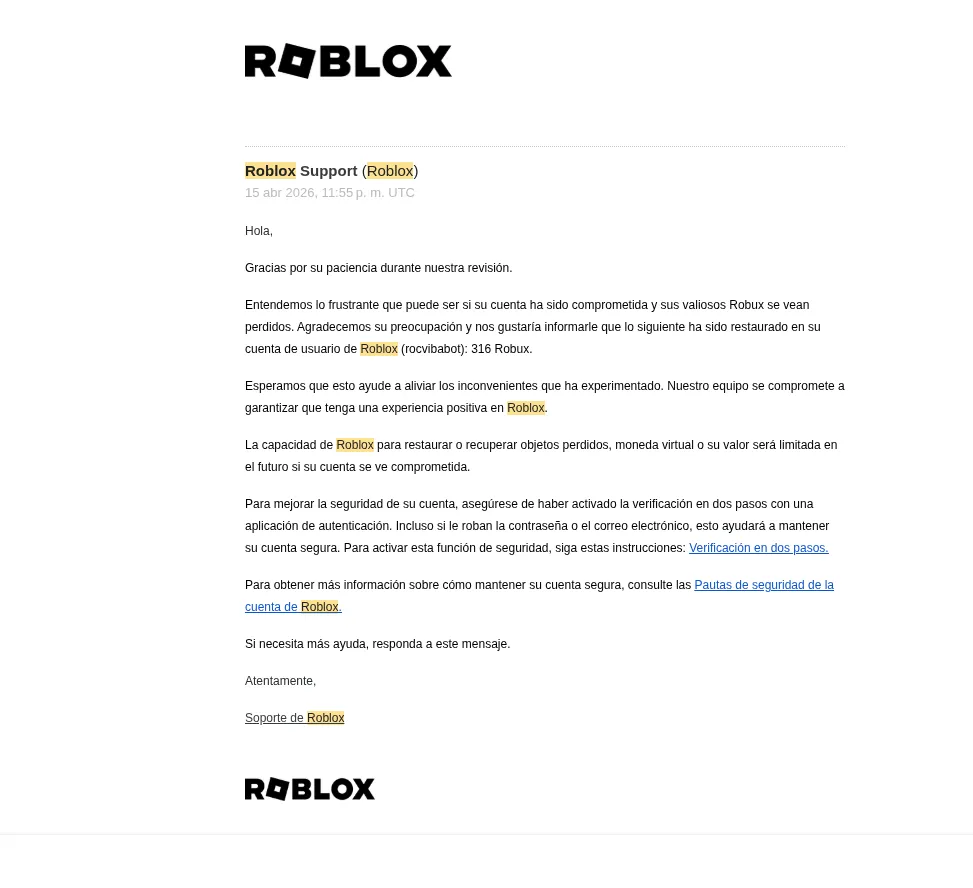
Worth sharing because a lot of people don’t bother reporting. They think “it’s just 3 euros” or “Roblox won’t do anything.” They did exactly what they should: investigated, identified the fraudulent transactions, and restored the balance. The platform responds when you give them the evidence.
The red flag I hadn’t taught him: the browser console
This is the part that was hardest to accept. I’m the person who monitors what Roc does online. I’m on it. I pay attention. But I hadn’t explained one specific thing:
Never copy and paste anything into the browser console unless you know exactly what it does. If someone asks you to, they want to steal information from your account.
It didn’t occur to me that he’d need to know that. Roc is nine. I didn’t expect him to know how to open the browser console. But he opened it. Because the tutorial told him to. And he trusts tutorials that teach him to code.
That’s the problem. Kids trust. And scammers know it.
What cookie stealing actually is (for non-technical parents)
When your child logs into Roblox, the browser stores a piece of data called a session cookie. Think of it as an entry pass that says: “this user already identified themselves, don’t ask for the password again.”
If someone gets a copy of that cookie, they can paste it into their own browser. And Roblox’s server will think it’s your child. They don’t need the password. They don’t need to pass any verification. They just need that cookie.
It’s like someone cloning your house key. They don’t break down the door. They walk in like they live there.
Tutorials that ask you to “open the console and copy data” are designed to steal exactly that. They disguise it as a tool, a trick, a hack to get free stuff. But what they actually do is steal the session.
How to protect your kid’s Roblox account: 5 steps
1. Explain what the browser console is. They don’t need to understand the code. Just one rule: if anything asks you to open the console (F12) and paste text, stop. Ask me first.
2. Enable two-step verification. Not the email kind — use an authenticator app like Google Authenticator or Microsoft Authenticator. If someone steals the cookie, they won’t be able to make critical changes without the second factor.
3. Enable the Roblox parental PIN. A four-digit PIN that blocks changes to account settings without your approval.
4. Check the browser history occasionally. Not to spy. To catch tutorials that ask your kid to do things they shouldn’t. If you see references to “console,” “F12,” “inspect,” “copy cookies” — time to talk.
5. Don’t blame them. Roc didn’t do anything wrong. He was learning to code. He followed a tutorial like he follows all the others. The difference is this one was malicious. The problem isn’t that your kid trusts what they read. The problem is that there’s content designed to exploit that trust.
Cookie stealing is just one of the online safety risks kids face. If your child plays Steal a Brainrot or other Roblox games, we reviewed the in-game safety risks point by point in a separate post: scams between players, chat with strangers and Robux spending.
Frequently asked questions
How did my kid’s Roblox account get hacked? The most common method isn’t guessing the password. It’s session cookie theft. If someone convinces your kid to open the browser console (F12) and copy certain data, they can grab the cookie that keeps the session alive. With that cookie, they can access the account from anywhere in the world without needing the password.
What is a session cookie and why is it dangerous? A session cookie is a piece of data your browser stores to remember you’re logged in. If someone copies that cookie, they can paste it in their own browser and the site will think they’re your child. It’s like cloning your house key — they don’t need to pick the lock.
What should I do if my kid’s Roblox account gets hacked? Three immediate steps: 1) Close all active sessions from Roblox security settings. 2) Change the password. 3) Enable two-step verification with an authenticator app like Google Authenticator or Microsoft Authenticator. Then review transaction history and contact Roblox support if you see fraudulent activity.
Can Roblox refund stolen Robux? Yes. In our case, Roblox investigated the fraudulent transactions and returned the stolen Robux within about two weeks. We reported suspicious donations to unknown users from locations that weren’t ours, and they acted on it. No guarantees, but it’s absolutely worth reporting with clear evidence.
How do I protect my kid’s Roblox account? Enable two-step verification with an authenticator app (not email — that can be compromised too). Enable the parental PIN. And most importantly: teach your kid to never copy and paste anything into the browser console. If a tutorial asks for it, that’s a red flag.